
Yeni Academy – Frequently Asked Questions & Troubleshooting
Welcome to the Yeni Academy Help Centre. Here you’ll find answers to the most common questions about using our platform.
Q: How do I create an account on Yeni Academy?
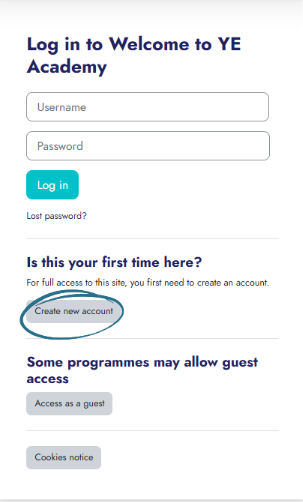
A: Go to learn.yeniacademy.co.uk and click “Create new account” in the middle of the homepage under “Is this your first time here?”.
Read YE Academy Terms of use and click “Next” at bottom of the terms of use page.
Follow on by accepting the terms of use.
Fill in your Username (we advise to have this as c2k(work) email), password, email, full name, Select school name and relevant user profile role.
Complete Authentication and click “create my new account”
Q: I didn’t receive the verification email. What should I do?
A: Check your spam or junk mail folder. If it's still missing, go back to the login page and click “Get in Touch” to contact our support team.
Q: Can I preview a course before enrolling?
A: Our courses are exclusively available to our partner schools, each of which is provided with a unique enrolment key.
If you’re interested in previewing a course or learning more about partnership opportunities, please get in touch with us at programmes@yeni.co.uk.
Account & Login Issues
Q: I forgot my password. How can I reset it?
A: Click “Forgot Password?” on the login page and follow the prompts to reset your password via email.
Q: How do I update my personal details (email, name, etc.)?
Log in, click on your profile icon, and go to “Account Settings” to update your details.
Q: I’m having trouble logging in. What should I check?
Ensure your email and password are correct.
Make sure your account is verified.
Try resetting your password if needed.
Clear your browser cache or try a different device.
Q: Why can the teacher access YE Academy, but the students can’t?
In some cases, this happens because student accounts have different access permissions through C2k or school IT systems. If students cannot access YE Academy while staff can, the issue may need to be flagged with your school’s IT coordinator. They can whitelist the YE Academy URL for the student group to ensure access is enabled.
Course Access & Content
Q: How do I start a course I’ve enrolled in?
Log into your dashboard at learn.yeniacademy.co.uk, go to “My Courses”, and click “Start” or “Resume” next to the course title.
Q: My enrolment key isn’t working
When entering your enrolment key, ensure that no extra spaces are copied before or after the code, as these count as characters. Also check that the key has no formatting applied (such as bold or italics), as this can prevent it from being recognised correctly.
Q: Interactive presentations aren’t playing properly. What can I do?
Ensure pre-delivery questionnaire has been completed.
Check your internet connection.
Refresh the page.
Use the latest version of Chrome with Pop Ups turned on.
Disable any browser extensions or ad blockers that may interfere.
Q: Can I download course materials?
A: Downloadable resources (PDFs, slides, etc.) will appear under each lesson module if available. Interactive presentations are streamed only and not downloadable.
Certificates & Progress
Q: Do I get a certificate after completing a course?
A: Yes. Once you complete all modules, you’ll be able to download a Young Enterprise Certificate of Completion from your course dashboard.
Q: My course progress isn’t saving. What should I do?
Make sure you're logged in while learning.
Avoid using “incognito/private” mode.
If the issue persists, try a different browser or contact support.
Support & Contact
Q: How can I contact Yeni Academy support?
A: You can email us at programmes@yeni.co.uk or use the contact form on our website.
Q: Where can I find updates or platform announcements?
A: Follow us on social media or check your dashboard notifications for important updates.
Instagram: @youngenterpriseni
Twitter: @YE_NI
LinkedIn: Northern Ireland Young Enterprise
YouTube: Northern Ireland Young Enterprise