
YE Academy Help Centre
Frequently Asked Questions
Quick answers for schools, teachers and students using the YE Academy platform.
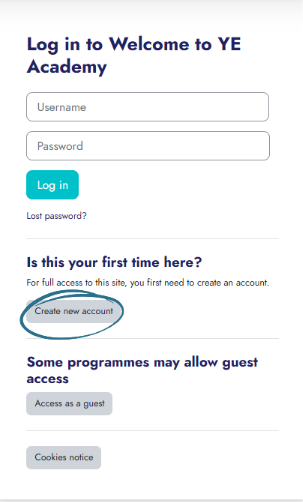
How do I create an account on Yeni Academy?
Go to learn.yeniacademy.co.uk and click “Create new account” under “Is this your first time here?”.
- Read and accept the YE Academy Terms of Use.
- Enter your username, password, email, full name, school name and user role.
- We recommend using your C2K or work email address.
- Complete authentication and click “Create my new account”.
I didn’t receive the verification email. What should I do?
Check your spam or junk mail folder. If it is still missing, go back to the login page and click “Get in Touch” to contact our support team.
Can I preview a course before enrolling?
Our courses are available to partner schools, each of which is provided with a unique enrolment key.
To preview a course or learn more about partnership opportunities, email programmes@yeni.co.uk.
I forgot my password. How can I reset it?
Click “Forgot Password?” on the login page and follow the prompts to reset your password by email.
How do I update my personal details?
Log in, click on your profile icon, and go to “Account Settings” to update your email, name or other personal details.
I’m having trouble logging in. What should I check?
- Make sure your email and password are correct.
- Make sure your account has been verified.
- Try resetting your password.
- Clear your browser cache or try a different device.
Why can teachers access YE Academy, but students can’t?
This can happen because student accounts may have different access permissions through C2K or school IT systems.
If students cannot access the platform, ask your school’s IT coordinator to whitelist the YE Academy URL for student users.
How do I start a course I’ve enrolled in?
Log into your dashboard at learn.yeniacademy.co.uk, go to “My Courses”, and click “Start” or “Resume” beside the course title.
My enrolment key isn’t working. What should I do?
Check that no extra spaces have been copied before or after the enrolment key. Extra spaces count as characters.
Also make sure the key has no formatting applied, such as bold or italics.
Interactive presentations aren’t playing properly. What can I do?
- Make sure the pre-delivery questionnaire has been completed.
- Check your internet connection.
- Refresh the page.
- Use the latest version of Chrome with pop-ups turned on.
- Disable browser extensions or ad blockers that may interfere.
Can I download course materials?
Downloadable resources, such as PDFs and slides, will appear under each lesson module if available. Interactive presentations are streamed only and cannot be downloaded.
Do I get a certificate after completing a course?
Yes. Once you complete all modules, you can download a Young Enterprise Certificate of Completion from your course dashboard.
My course progress isn’t saving. What should I do?
- Make sure you are logged in while learning.
- Avoid using incognito or private browsing mode.
- Try a different browser or contact support if the issue continues.
How can I contact Yeni Academy support?
Email programmes@yeni.co.uk or use the contact form on the Young Enterprise NI website.
Where can I find updates or platform announcements?
Follow us on social media or check your dashboard notifications for important updates.
- Instagram: @youngenterpriseni
- Twitter/X: @YE_NI
- LinkedIn: Northern Ireland Young Enterprise
- YouTube: Northern Ireland Young Enterprise
Still Need Help?
Contact The YE Academy Team
Email programmes@yeni.co.uk and we’ll help you get sorted.